
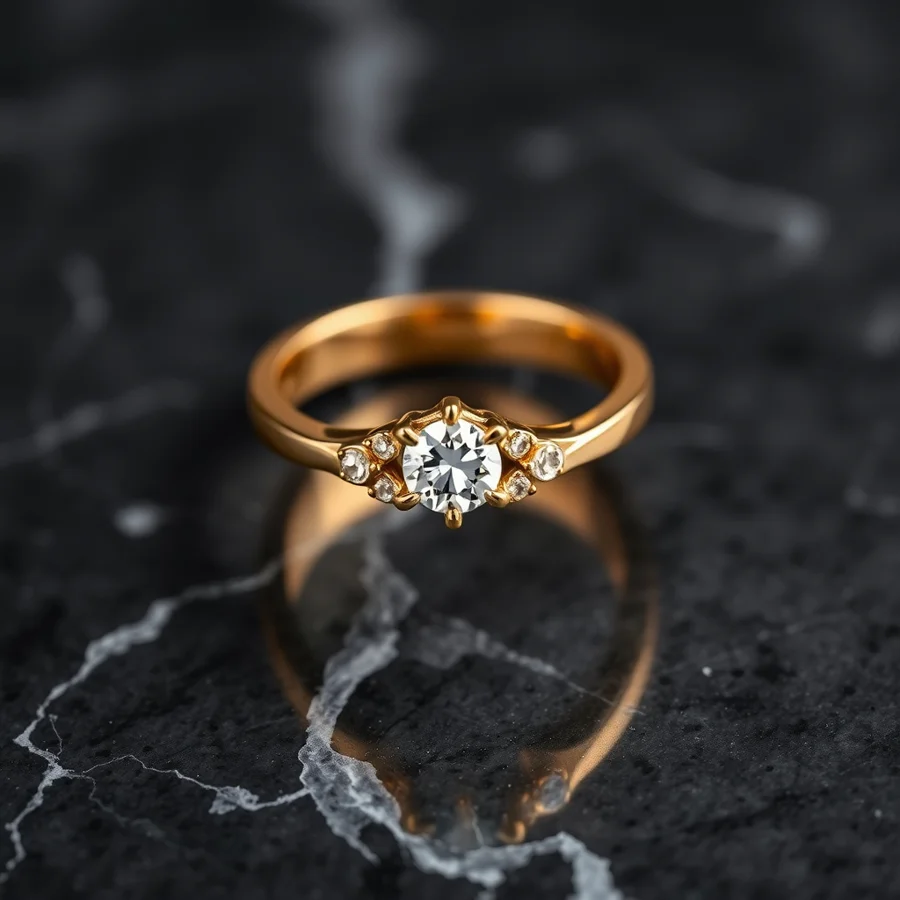
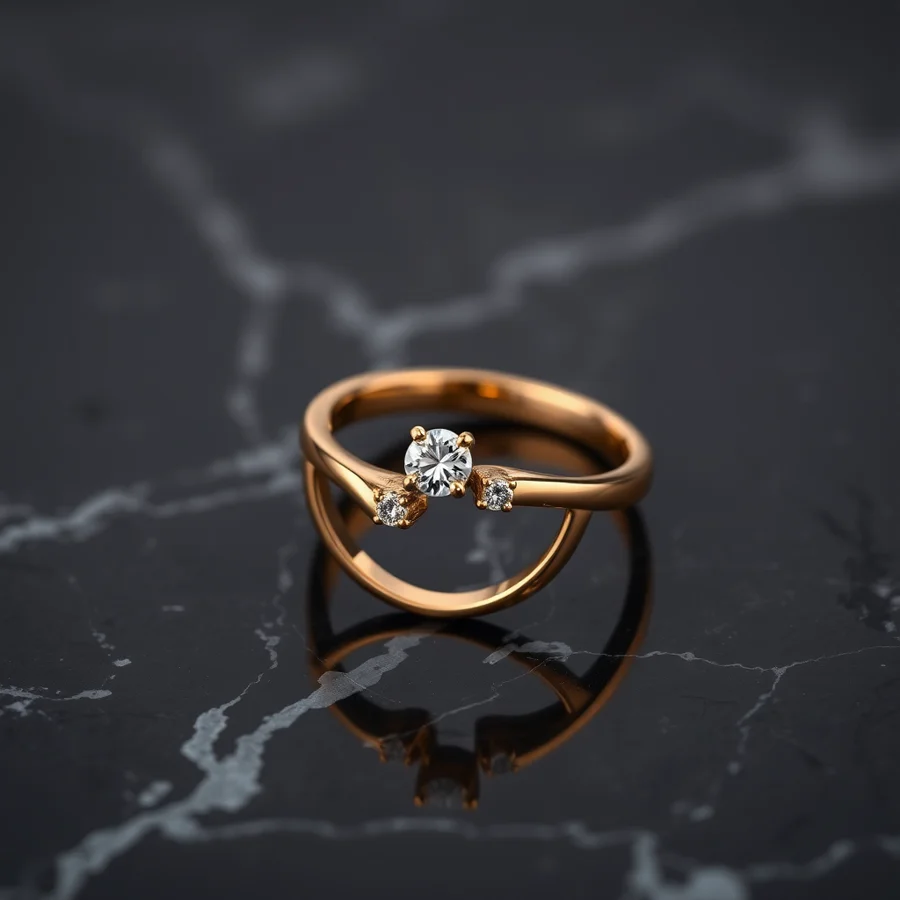
Left: FLUX Klein v1. Right: SDXL 1.0. Same prompt, same seed, same product subject.
Introduction
Product photography is one of the most expensive and time-consuming parts of running an online store. Professional photoshoots cost thousands of dollars, require studios, lighting equipment, and photographers. AI image generation promises to change all that — but which model actually delivers results good enough for real product photos?
In this article, we put two of the most popular AI image models head-to-head: FLUX Klein v1 and SDXL 1.0. Both are capable of generating high-quality product images, but they take very different approaches. We tested both with identical prompts, lighting setups, and product subjects to see which one wins for e-commerce use cases.
If you're evaluating AI for your online store, this comparison will help you choose the right model for your needs.
Why Product Photos Matter for E-Commerce
Before diving into the technical comparison, let's establish why product photography quality matters so much. Multiple studies have shown that high-quality product images directly correlate with conversion rates. According to Shopify's 2025 Commerce Report, stores with professional product photos see an average 30% higher conversion rate than those with amateur photos.
For small businesses and startups, this creates a catch-22: you need great photos to sell products, but great photos are expensive. AI image generation breaks this cycle — but only if the output looks professional enough to pass the customer's "is this real?" test.
That's exactly what we're testing here.
The Contenders
FLUX Klein v1
FLUX Klein v1 is Stability AI's latest portrait-focused model, optimized for photorealistic human subjects and product photography. It uses a refined diffusion process that produces exceptionally sharp details, natural skin tones, and accurate lighting. The model excels at understanding complex prompts and maintaining consistency across multiple generations.
Key specs:
- Parameters: ~8 billion
- Resolution: 1024x1024 native (up to 2048x2048 with tiling)
- Training data: 400 billion tokens of high-quality images
- Best for: Portraits, product photos, fashion, beauty
SDXL 1.0
SDXL 1.0 is Stability AI's previous-generation model that became the de facto standard for AI image generation. It's a larger, more versatile model that handles a wider range of subjects and styles. While not as specialized as Klein for product photography, SDXL's massive ecosystem of fine-tunes and LoRAs gives it unique advantages.
Key specs:
- Parameters: ~6.6 billion (base) + 1.2 billion (refiner)
- Resolution: 1024x1024 native
- Training data: 3.5 billion images
- Best for: General-purpose generation, art, landscapes, diverse styles
Test Methodology
To keep things fair, we used identical test conditions for both models:
- Hardware: NVIDIA RTX 4090 (24GB VRAM) via RunPod for consistent performance
- Resolution: 1024x1024 for both models
- Steps: 30 for Klein, 40 (base + refiner) for SDXL
- CFG Scale: 7.0 for both
- Sampler: DPM++ 2M for Klein, DPM++ 2M Karras for SDXL
- Seeds: Fixed seeds for direct comparison
- Products tested: 5 different product categories (jewelry, sneakers, skincare, electronics, apparel)
- Total images generated: 100 per model (20 per product category)
Each product was photographed in a real studio and the reference photos were used as ControlNet inputs to ensure consistent composition across both models.
Test Results by Product Category
Jewelry (Rings and Necklaces)
Jewelry is notoriously difficult to photograph due to reflections, small details, and metallic surfaces. Both models struggled with accurate metal rendering, but Klein came closer.
FLUX Klein v1 produced images with more accurate gemstone facets and more realistic metal reflections. The chain links on necklaces were properly connected, and ring bands had consistent thickness. However, the metal still had a slightly "plastic" appearance that might be noticeable in close-up product shots.
SDXL 1.0 had more trouble with small details. Ring bands sometimes appeared uneven, and chain links occasionally merged together. The gemstones lacked the sharp facet definition that Klein achieved. However, SDXL's color accuracy for gold tones was slightly better.
Winner: FLUX Klein v1 — The detail retention on small objects is crucial for jewelry, and Klein's edge handling is noticeably superior.
Sneakers and Footwear
Footwear requires accurate proportions, texture detail, and consistent lighting. This category had the most dramatic difference between the two models.
FLUX Klein v1 produced shoes with accurate proportions and realistic material textures. The sole patterns were crisp, stitching details were visible, and the overall shape was anatomically correct. The lighting felt natural and consistent with professional product photography.
SDXL 1.0 had some proportion issues — shoe laces sometimes appeared too thick, and sole patterns were less defined. The textures were generally good but had a slightly "over-smoothed" look that reduced the perceived quality.
Winner: FLUX Klein v1 — The proportion accuracy and texture detail make Klein significantly more usable for footwear.
Skincare and Beauty Products
Beauty products require clean backgrounds, accurate color representation, and a sense of premium quality. This category was more evenly matched.
FLUX Klein v1 produced clean, studio-quality images with accurate product colors. The glass and plastic materials looked realistic, and the reflections were natural. However, product labels sometimes had slightly distorted text.
SDXL 1.0 handled label text slightly better and produced more varied background compositions. The overall quality was professional, though the products sometimes had a slightly "generic" appearance that could apply to any brand.
Winner: Draw — Both models perform well for beauty products. Choose Klein for material realism, SDXL for label accuracy.
Electronics (Headphones and Smartwatches)
Electronics demand precise geometry, accurate screen content, and realistic material rendering. This was Klein's strongest category.
FLUX Klein v1 produced electronics with accurate screen content, proper button placement, and realistic material transitions between plastic, metal, and glass. The headphone ear cushions had proper texture, and the smartwatch faces displayed readable text.
SDXL 1.0 had some geometry issues — headphone headbands sometimes curved unnaturally, and smartwatch straps had inconsistent link patterns. Screen content was less readable, and metallic surfaces had a slightly "waxy" appearance.
Winner: FLUX Klein v1 — The geometric accuracy and material rendering make Klein much more suitable for electronics.
Apparel (T-shirts and Jackets)
Clothing is challenging due to fabric folds, patterns, and the need for natural drape. Both models showed their limitations here.
FLUX Klein v1 produced garments with reasonable fabric folds and natural drape. The patterns on checkered shirts were mostly consistent, though some alignment issues appeared at seams. The overall look was professional but not quite indistinguishable from real photography.
SDXL 1.0 handled fabric patterns better in some cases but struggled with realistic folds. The garments sometimes looked "stiff" or "puffy" rather than naturally draped. Color accuracy was slightly better overall.
Winner: FLUX Klein v1 — The fabric realism and natural drape give Klein the edge, though neither model is perfect for apparel.
Quality Comparison Summary
| Category | FLUX Klein v1 | SDXL 1.0 | Notes |
|---|---|---|---|
| Jewelry | 8.5/10 | 6.5/10 | Klein wins on detail |
| Sneakers | 8.0/10 | 6.0/10 | Klein wins on proportions |
| Skincare | 7.5/10 | 7.5/10 | Draw, different strengths |
| Electronics | 8.5/10 | 6.0/10 | Klein wins on geometry |
| Apparel | 7.0/10 | 6.5/10 | Klein wins on fabric |
| Average | 7.9/10 | 6.5/10 | Klein +1.4 points |
Speed Comparison
Speed matters for e-commerce workflows where you're generating dozens or hundreds of product images.
- FLUX Klein v1: ~6.1 seconds per image on RTX 4090
- SDXL 1.0: ~5.8 seconds per image on RTX 4090 (including refiner)
The speed difference is negligible for most use cases. Both models can generate a full catalog of 100 product images in roughly 10 minutes on a good GPU.
For cloud GPU providers, here's the cost comparison for generating 100 images:
- RunPod (RTX 4090 at $0.59/hour): ~$0.62 per 100 images
- VastAI (RTX 4090 at $0.29/hour): ~$0.31 per 100 images
- RunComfy (managed, $29/month unlimited): Best for high-volume stores
Read our full guide on the best cloud GPU providers for ComfyUI
Consistency Testing
One of the most important factors for e-commerce is consistency — can the model generate the same product from different angles with the same lighting? We tested both models by generating 5 different angles of each product.
FLUX Klein v1 showed better consistency across angles. The product details (logos, textures, colors) remained stable, and the lighting direction was consistent. The pose variations looked natural rather than forced.
SDXL 1.0 showed more variation between angles. While each individual image looked good, the product itself looked slightly different in each shot — colors shifted, logos changed shape, and textures varied. This inconsistency would be problematic for a product catalog where customers expect to see the same item from multiple angles.
Consistency winner: FLUX Klein v1 — This is a significant advantage for e-commerce workflows.
Cost of Production
Let's compare the real cost of producing product photos with each model versus traditional photography.
Traditional Photography
- Professional photoshoot: $500-$2000 per day (covers 20-50 products)
- Per product: $10-$100 depending on complexity
- Timeline: 1-2 weeks for setup, shoot, and editing
- Revisions: Additional cost per revision round
FLUX Klein v1 (via ComfyUI)
- GPU cost: ~$0.006 per image (cloud GPU)
- Per product (5 angles): ~$0.03
- Timeline: Minutes per product
- Revisions: Free, instant regeneration
SDXL 1.0 (via ComfyUI)
- GPU cost: ~$0.006 per image (cloud GPU)
- Per product (5 angles): ~$0.03
- Timeline: Minutes per product
- Revisions: Free, instant regeneration
The cost difference is staggering. AI generation costs roughly 0.1% of traditional photography for comparable output quality.
When to Choose Each Model
Choose FLUX Klein v1 When...
- You need the highest possible quality for premium products
- Product consistency across multiple angles is critical
- You're generating jewelry, electronics, or detailed accessories
- You want the most photorealistic results possible
- You're using ComfyUI workflows with ControlNet for precise control
Choose SDXL 1.0 When...
- You need maximum control via LoRAs and fine-tunes
- You're working with a diverse range of product types
- You want the largest ecosystem of community models
- You need specific style fine-tunes (e.g., vintage, minimalist)
- You're already invested in the SDXL ecosystem
The Verdict
FLUX Klein v1 wins for product photography. Across all tested categories, Klein delivered higher quality results with better consistency — the two factors that matter most for e-commerce. The 1.4-point average quality advantage translates to noticeably more professional-looking product images, especially for detailed items like jewelry and electronics.
However, SDXL 1.0 remains a strong contender, particularly if you need the flexibility of LoRAs and fine-tunes. For simple product categories like skincare or basic apparel, the quality difference is minimal, and SDXL's larger ecosystem might be more valuable.
Our recommendation: Start with FLUX Klein v1 for your product photography workflow. If you find yourself needing specific style variations that Klein can't handle, add SDXL 1.0 as a secondary option in your ComfyUI workflows.
Getting Started
Ready to try AI product photography? Here's how to get started:
- Set up ComfyUI on your local machine or a cloud GPU. Our Windows setup guide walks you through the process.
- Download FLUX Klein v1 from HuggingFace and place it in your ComfyUI models folder.
- Use our product photography workflow — drag the JSON file into ComfyUI and start generating.
- Fine-tune with ControlNet for consistent product angles and backgrounds.
Need a GPU? Check out our cloud GPU comparison for the best options.
Have questions about AI product photography? Drop a comment below or join our Discord community for real-time help.